Pages

Monday, 9 April 2018

ActiveX Data Objects (ADO) Architecture & Components Summary

This chapter has explained the architecture behind the ActiveX Data Objects technology. The following is a list of some key items pointed out in this chapter:

ADO offers a generic data-access interface that is used to communicate with a wide range of proprietary data sources and providers.

With ADO, the burden of creating efficient data access is placed upon the individual data provider, not the data-access technology.

The ADO architecture is comprised of nine major components. These components include the Connection object, the Command object, the Parameters collection and the Parameter object, the Recordset object, the Fields collection and Field object, the Record object, the Stream object, the Properties collection and the Property object, and finally, the Errors collection and the Error object.

The rest of this book walks you through the nitty gritty of application development using the ActiveX Data Objects technology. You will next learn how to access ADO through various different development languages, and then we will dive into the actual components of ADO.

ActiveX Data Objects (ADO) Components

ActiveX Data Objects consists of a generic-style data-access structure that allows you to access any data source, regardless of its structure, with the same programming interface. The individual objects within the ADO object model are used to provide all of the datastorage, manipulation, and retrieval commands needed when writing a data-based application. ADO includes the following objects and collections:
  • The Connection object
  • The Command object
  • The Parameters collection and the Parameter object
  • The Recordset object
  • The Fields collection and the Field object
  • The Record and Stream objects
  • The Properties collection and the Property object
  • The Errors collection and the Error object
  • In the next sections, I take a closer look at these objects and collections.
The Connection Object:-
The Connection object is the gateway for all data communications through ActiveX Data Objects. Figure 2-1 illustrates the Connection object's object model.

Figure 2-1. The Connection object's object model


In order to access data from any source, a connection for that source must first be established. ADO uses the Connection object to accomplish this. The Connection object uses information that you provide to establish a unique connection to a particular OLE DB data source. The standard information that a Connection object accepts includes filenames, data-provider names, usernames, and passwords. If your particular data provider needs additional information, this information can be passed from the Connection object directly to your data provider. By allowing this form of pass-through of connection specifications, ADO does not make any assumptions or restrict itself to one type of data source. All of the functionality of the chosen data provider is made available through the use of the Connection object.

A Connection object is used to accomplish the following tasks:
  • Select a data source and data provider
  • Open and close a connection on a selected data source
  • Manage transactions on a data source
  • Execute queries on a data source
Connection objects can be created explicitly and used later with the Command and Recordset objects, or the Connection object can be created by the Command and Recordset objects implicitly, behind the scenes.

In addition, the Connection object reports errors through an Errors collection and provides ADO version information.

The Command Object:-
The Command object is used to execute instructions -- whether for storing, manipulating, or gathering information -- on a specific data source. Figure 2-2 shows the Command object's object model.

Figure 2-2. The Command object's object model


Once you're connected to a data source, you naturally want to perform some operation on it. One of your options is to use the Command object, which executes commands against the associated data source. There are five types of commands that a Command object can execute:

A SQL statement:-
Probably the most popular type of command, a SQL statement can gather information, manipulate information, or manipulate the structure of the underlying database.

A parameterised query (a query with input and output parameters):-
A parameterised query uses variables that set or return values that are part of a particular query or SQL statement.

A stored procedure from within the current data source:-
A stored procedure is a query that resides within the connected data source. By identifying the name of a stored procedure, you can execute, through the data provider, a query that is defined outside of ADO. Stored procedures can also use parameters.

A statement to open a single table:-
An open table-type statement does not query data, but instead returns all of the fields in all of the records belonging to the specified table. This is comparable to the DAO OpenTable method.

A string command passed directly to the data provider:-
A string command enables the data provider to perform a specific operation that is defined by the provider itself and outside of ADO. Such a command is commonly used, for example, when a particular data provider offers its own version of the SQL language. In such a situation, ADO has no idea how to process a proprietary SQL string for this language, so you tell ADO to forward it directly to the data provider. The data provider, in turn, can take this string and process a result that can be sent back through ADO to your application. The OLE DB provider for Internet Publishing, for instance, allows the passing of a URL statement to identify a data source, within the Command object.

If the Command object is used to retrieve data, then a Recordset object containing the requested records is created and passed back to the application.

The Command object can be associated with a currently open connection, or it can be created independently of any existing Connection objects, in which case the Command object creates its own Connection object but does not share it with you.

The Parameters collection and the Parameter object:-

The Parameters collection belongs to the Command object. This collection stores Parameter objects that are used to make parameterized queries or to invoke stored procedures. Every Command object has a Parameters collection created by ADO. You can populate the Parameters collection, or it can be refreshed to retrieve the already defined parameters -- for the Command -- from the data source.

The Parameters collection and the Parameter object's object model is displayed in Figure 2-3. This collection and object combination defines the characteristics of parameters when referring to a parameterized query or defines the input and output arguments when referring to a stored procedure.

Figure 2-3. The Parameters collection and the Parameter object's object model


With the Parameter object, you can set or read the name, value, and characteristics of a given parameter. If you know this information beforehand for any stored procedure or parameterized query, you can potentially save valuable time by creating Parameter objects yourself that ADO would otherwise spend trying to learn this information.

The Recordset Object:-

A Recordset object is used to access data on a record level. Figure 2-4 illustrates the Recordset object model.

Figure 2-4. The Recordset object model


A Recordset object can be created by the developer to return data itself, or it can be returned from executing a command with a Connection or Command object. This information can be obtained from a table in the underlying data source or from a previous SQL statement, query, or stored procedure executed through the Command object.

The Recordset object consists of a Fields collection of individual Field objects, each with its own properties, characteristics, and values. (The Recordset object may be familiar to you if you have worked with DAO before.)

The Recordset object works well with all types of data because it relies on the ability of all data to be broken into structured records composed of one or more fields. It is easy to see this structure in a database, but what about a data source such as a directory? In this case, each file in the directory may be a record. Each field of this record might be a different attribute of that file, including its name, its size, its creation date, its last modification date, its contents, etc. It is important to realize that all stored data can have a structure that represents records with fields that are located within tables, just as in a more obviously structured database.

With the Recordset object, we can move a virtual record pointer around a list of records, searching for records, placing bookmarks, and editing specific values of designated fields. We can also add and remove records from the recordset. We can view and edit the properties of the fields that make up these records.

Recordset objects, like Command objects, can be created using an existing Connection, or Recordset objects can implicitly create their own Connection object, which is not automatically passed back to your application, unless you request it. Recordsets show you one record at a time. With this view, you can manipulate data any way that you would like through a Fields collection or Field object, which are discussed next. Multiple Recordset objects can access the same data, and, as a matter of fact.

There are four types of cursors available in ADO. A cursor is a way of working within a result set or records. Each provides a different view of the same data, and each has its pros and cons. Not all providers support every type of cursor. The four types of cursors are:

Forward-only cursor:-
The forward-only cursor is exactly the same as the static cursor except that you can only move forward through the records in your recordset. Unless you specify otherwise, this is the default view of a recordset, and it offers the best performance of all four recordset types.

Dynamic cursor:-
This view of your data source allows you to see dynamically any additions, changes, or deletions made by other users of the data source. The dynamic cursor is the most resource-intensive type of recordset.

Keyset cursor:-
This view of your data source only allows you to see modifications made to the data in your recordset by other users. It does not show you records that have been added by other users, and it denies you access to records that have been deleted. The keyset cursor offers slightly better performance than the dynamic cursor.

Static cursor:-
The static cursor offers you a snapshot of your data through the Recordset object. The static cursor does not show you any additions, modifications, or deletions of the records in your recordset, regardless of what other users are doing to it. It is generally used for data gathering and reporting in a multi-user environment. The static cursor offers abundant speed advantages over both the keyset and dynamic cursor.

The Recordset object offers two types of data updating: immediate update mode and batch update mode. In the immediate update mode, changes are made one record at a time. Once you have indicated that you have finished updating a record, the information is immediately transferred to the underlying data source and written. On the other hand, the batch update mode allows the data provider to cache several records in memory to be sent to the data source in a single call, where it is then written as a batch.

The Fields Collection And The Field Object:-

The Fields collection belongs to the Recordset object and the Record object. The Fields collection is a group of Field objects that represent individual columns in a recordset. Figure 2-5 shows the Fields collection and Field object's object model. Every Recordset object and every Record object has a Fields collection that is created by ADO.

Figure 2-5. The Fields collection and the Field object's object model

The Field object offers the developer complete access to the underlying data of a chosen recordset. The Field object makes available its field's name, value, data size, and attributes. With this information, we can read, alter, and verify field information within the current record of our recordset.

The Record Object:-

The Record object is one of the newest additions to the ADO object model added with Version 2.5. It can represent either a single record within a Recordset object, or it can represent a resource within a hierarchical data source. A Record object can be obtained from a Recorset object (representing a single record of the complete recordset), or it can be created as a standalone object to represent a resource such as a file or a directory. Figure 2-6 shows the Record object's object model.
Figure 2-6. The Record object's object model

One of the unique features of the Record object is that it can be used to navigate hierarchical data sources such as a file directory. By using the OLE DB provider for Internet Publishing, the Record object allows the developer to access resources within a web server (files and directories).

The Record object allows for file and directory manipulation, such as copying, moving, and deleting resources. In addition, the Record object can be used to access the actual data belonging to one of these resources through the exposure of a default Stream object.

The Stream Object:-

The Stream object was added at the same time as when the Record object was added to ADO with Version 2.5. The Stream object is used to view and manipulate text and binary data belonging to a resource such as a file or a buffer in memory. A Stream object can be obtained from a Record object or it can be created as a standalone object. Figure 2-7 shows the Stream object's object model.

Figure 2-7. The Stream object's object model

An additional feature of the Stream object is its ability to be created independently of a specified data source. In other words, the Stream object can be created in memory and need not be tied to any predefined data. In this way, the Stream object can be used as a utility object such as a buffer. Added functionality allows the Stream's buffer to be persisted (saved to the datasource) to local files in any directory.

The Properties Collection And The Property Object:-

The Connection, Command, and Recordset objects each have their own Properties collection. The Properties collection consists of individual Property objects that hold specific information about their associated objects. These collections are supplied automatically by ADO. Figure 2-8 illustrates the Properties collection and Property object's object model.

Figure 2-8. The Properties collection and the Property object's object model

In order to fine-tune all of these objects -- the Connection, Command, Recordset, and Field objects -- ADO offers the Properties collection. This collection contains individual Property objects that allow dynamic characteristics of the data source belonging to the current data provider to be accessed within each object. The Property objects may inform you of special features that are unique to the data source and are not standard ADO functionality. The Property objects may also tell you what standard ADO functions are supported by the current data provider so that you can avoid problems when attempting particular commands. With this ability, we can determine at runtime the capabilities of the data source that we are trying to access. This allows our software to realize the full potential of data-source drivers.

One of the more flexible features of ADO is that it can offer the developer data providerdefined functions that are not part of the standard ADO specification. For instance, the Microsoft Cursor Service for OLE DB offers dynamic properties that are used to specify how often calculated and aggregate columns are calculated within a data-shaping query. Instead of working with only the lowest common denominator in data-access techniques, ADO allows your application to check for and take advantage of functions that are specific to a particular data provider. Each data provider uses the Property objects of the Properties collection differently, but they all use it to expose their special functionality. Consult the documentation of the data provider you are using in your application for more information on how to utilize the Properties collection and the Property object.

The Errors Collection And The Error Object:-

The Errors collection belongs to the Connection object but services all of ADO. The Errors collection is populated with Error objects whenever an error occurs within a single ADO data-access operation. Figure 2-9 shows the Errors collection and the Error object's object model.
Figure 2-9. The Errors collection and the Error object's object model

The Errors collection contains errors and warnings that are generated both by ADO and by the individual data provider being used. These messages allow us to scan and trap errors that arise when we access data sources. If ADO detects the error, then ADO will throw the error. But if the error is provider-specific, the data provider passes it back to ADO, which will report the error to you. What is nice about ADO's error capabilities is that they can tell you where an error was generated and which object produced the error.

An Error object is added to the Errors collection whenever an error occurs within ADO. The Errors collection is cleared right before a method that can generate an error is called. An Error object provides a description of the error, an error number, the name of the object that generated the error, the capability to access Windows help files based on the particular error, and error information from SQL data sources. An error object can also contain a warning that does not halt the execution of your application.

The ActiveX Data Objects (ADO) Architecture

In this chapter, we take a look at the ADO architecture; in the first section, "An Overview of the ADO Architecture," I describe how all of the pieces of ADO fit together to perform all of the functions that are necessary when accessing data sources. The remainder of the chapter is dedicated to the introduction and brief description of each of the key components of the ADO architecture.

An Overview Of The ADO Architecture:-
ADO is built upon layer after layer of solid, proven technologies that allow applications to communicate with data, regardless of where it resides or how it is structured, using any language or scripting language. How can one technology offer techniques to access both relational databases and nonrelational sources such as email?

ADO is the lowest common denominator when it comes to data access. It makes no assumptions when it comes to its data sources. Because ADO cannot assume that the data source being accessed is even a database, it must use objects, methods, and properties that are relevant to all data sources.

With ADO, the data provider (as described in the previous chapter, the connection between the data consumer, or application), not the data consumer, creates the driver for a data source. What this means is that the version of ADO does not dictate the data sources that are available to us; rather, it dictates the functionality that is passed through from the data provider to our software. The burden is on the data provider or vendor to create and distribute the proper resources necessary to develop with their product. ADO is a framework; the behavior of the OLE DB providers can vary widely. ADO does not require that all interfaces and functionality be offered by each provider.

By designing the architecture of ADO as a simple generic interface, ADO is not tied to a specific command type, but is capable of growing with the needs and the abilities of both developers and data sources.

A powerful feature of ADO is its ability to offer the functionality of a particular data source. If your data provider supports stored procedures, for example, then you can use them.

ADO has already proven to be a very well-thought-out interface for data access, which is worth its weight in gold because it is so very robust and scalable, in addition to being so easy to use.

In the second half of this chapter, I will take a closer look at how each of the major components of the ADO architecture fit together to achieve its desired goal of a generic data-access interface.

ADO Versus DAO and RDO

DAO assumes that it's working with a Jet engine and an Access database. RDO also makes an assumption -- specifically, that it is working with an ODBC data source. With DAO, a Database object is used to connect to a particular database. The type of database must be picked from a list that is stored in the version of DAO that you are using to develop your application. If a database is not included in the current list, you are out of luck -- you cannot access that database with the version of DAO that you have. ADO has been designed to work with any data source, regardless of version. As long as an OLE DB provider driver is available, you can access that data.

The problem with DAO is that it is too tightly bound to the Microsoft Jet engine. The problem with RDO is that it is too tightly bound to the ODBC API. In contrast, ADO is fitted loosely around the concept of data access and the assumption that all data can be visualized as collections of fields that constitute records. ADO's approach to data-access interfaces allows it to remain up to date with new types of data structures and data-access techniques. If a new type of data query is later invented, as long as a particular OLE DB data provider supports it, ADO can take advantage of it through the use of a Command object.

To summarize, ADO has a smaller object model than DAO because it has been generalized to allow easy access to any data source, not just Jet databases or ODBC data sources. Its architecture is very similar to that of DAO, but it simplifies data access more than DAO or RDO did by using fewer objects. Because the same interface can be used to access any type of data source, ADO is easier to use.

ActiveX Data Objects Summary

This chapter introduced ActiveX Data Objects, along with the closely related evolution of Microsoft data-access technologies. You also learned when to use ADO, the newest of these technologies. Following is a list of some key items, pointed out in this chapter:

ADO offers access to virtually any data source on any platform by being a data consumer of OLE DB. OLE DB is an industry standard promoted by Microsoft for exposing data, regardless of its source or format, in a uniform way. With the power of OLE DB, used via ADO, you gain access to any data source that provides an OLE DB interface.

ADO offers ease of use when writing data access applications. Since ADO was created with a similar design to DAO (Data Access Objects), developers are familiar with the object architecture. And since the development interface is consistent, you can develop for any OLE DB data source with ADO using the same syntax.

ADO offers language-independence and thus offers developers a choice of languages. With any language, including Visual Basic, VBScript, VBA, Visual C++, Java, and JavaScript, the development interface remains the same, which allows developers to focus on the ADO technology, not the implementation.
Throughout the rest of this book, you will learn how to use ADO with any development language. You will learn every object, collection, property, and method of ADO and how you can use each of them to access the power of OLE DB in your applications.

When To Use ActiveX Data Objects (ADO)

ADO is language-independent, as discussed earlier. This means that no matter which language you are developing with -- Visual Basic, VBScript, Visual Basic for Applications (VBA), Visual C++, Visual J++, or JavaScript -- the development interface is identical. This allows developers to become familiar with the technology itself, instead of worrying about learning a half-dozen different programming syntaxes for that technology. I suggest that you use ADO whenever your application fits into any or all of the following categories:
  • Your application accesses or may later need to access more than one data source.
  • Your application accesses or may later need to access data sources other than ISAM or ODBC databases.
  • Your application spans or may later span a heterogeneous network.
  • Your application uses or may later use multiple languages.
If your application needs to access more than one type of data source, then you should consider integrating ADO technology into your application. For instance, if you were designing an application that had to search Word documents, email messages, and a SQL Server database for keywords and then to show related information based on that query, ADO is the best choice. With ADO, you can create a component to search all three of these data sources using identical code, saving you time in development, as well as in maintenance and upkeep. This choice also provides the option of adding a fourth data source to your application at some later time with little or no additional overhead in development.

If your application may access data sources other than conventional ISAM or ODBC databases, you should use ADO. With ADO, you can search through an Excel worksheet just as if you were searching through email messages. If you use some other technology besides ADO, you must not only code two different components, one for each data source, but you also need to learn that other technology. In this case, you would have to research MAPI API calls, as well as Word document file structures. And then what happens when Word comes out with a new version? Or what about when more APIs are added to MAPI? You could easily ignore these until your application becomes so outdated that it renders itself useless. With ADO, you simply use the data service providers supplied by Microsoft for both Excel and Word so that the ability to access and manipulate these data sources are exposed identically through ADO.

If your application has or may spread across a heterogeneous network, such as the Internet or your corporate intranet, you should use ADO. For instance, consider an application that is deployed from your company's server to each employee. This application might access data stored on a mainframe containing legacy data. From this point, ADO serves as a driver to access data on this mainframe platform. This alone would save you valuable time and effort, because in order to access the mainframe data source by some other means, you would have to write custom drivers, or even worse, spend a fortune on a third-party tool that might not do everything that you want. Even the client side would benefit from ADO. Suppose you have employees that don't have a Windows machine in front of them, but who need access to the same data that someone running Windows has. Other employees might use a Sun workstation, for instance. As long as they use a browser that supports ActiveX technology, such as Internet Explorer, it is as if they are running the same application. In addition, if your application is prone to updates or fixes, by deploying it over the network using Internet Information Server (IIS) along with Active Server Pages (ASP), you can automatically (and transparently) update the client's version of the application each time it changes.

If your application uses multiple languages, especially if they are in the same tier of an niter client/server architecture, then ADO is the best choice. If you are the only developer of an application, or even if there are a handful of developers, then by sticking to a language-independent data-access technique, you eliminate the need to know multiple implementations of the same technology. For instance, if your application has business rule components that update the data source, query the data source, or delete from the data source, it is very likely in today's development environments, that each component could be written in a completely different language. By fully understanding ADO, you can make the best use of the same technology in each of these languages.
  • On the other hand, there are a few cases in which you shouldn't use ADO. If your application falls into any of the following categories, an alternative method of data access might be preferable:
  • Your application is already too far along to redesign and currently does not support business components for data access.
  • Your application needs to read in only text data from a flat file, which cannot be broken down into logical rowsets.
  • Your application saves data in your own format, and you do not wish to offer others access to your data through OLE DB.
If your application is already under development, it's probably too far along to turn back now. If it does not support business components for data access, you might not have a choice in converting to ADO. If the data-access technology, whether DAO, RDO, or something else, has not been placed within designed business components to handle the data access, you would most likely spend more time rewriting your application to support ADO than is justified.

By using business components in your applications, you can alter a few areas of code to achieve a widespread result. In this case, if your application had a component to read from your data source and a component to write to your data source, your application would call the business components rather than calling DAO, RDO, or even ADO directly. When a new technology such as ADO comes along, you simply change the two components, as opposed to changing every location in your application that now calls the components.

If your application will read in only text data from a flat file, which cannot be broken into logical rowsets of data, you may be better off using the Visual Basic Open statement, or the file-access statement equivalent for the language you are developing in. For instance, if your application displays a readme text file in a registration screen, can you imagine opening up a database and using the rowset methodology on streamed text? You should use the Open statement, if you're using Visual Basic, to read in the readme text file yourself. ADO is overkill in a situation like this.

If your application is going to save state information or other data and will not allow others to view this data through OLE DB or any other conventional database technology (DAO, RDO, ODBC API, or ADO), you may not want ADO. To ensure the security of your data, it would be wise for you to write your own functions for storing and retrieving information from an encrypted binary file. This binary file would have a structure that only you, as the developer, would be aware of, as opposed to the structure of an OLE DB-enabled file, which can be read at runtime. Of course, even though nobody knows the structure of your binary file, people are smart -- they could figure it out. To ensure that people can't see the data, you must encrypt it. For instance, you might want to write an application that does your taxes for you (and pretend that nobody else ever wrote a program like this before, so that we have a reason to do it now). After a year of entering financial data, the user can automatically print tax reports and forms that can be sent the government. The data that is entered all year long obviously has to be saved somewhere, but the question is where. My suggestion in this case would be to create a binary file in your own data structure, hiding that structure from the outside world. This file will hold personal financial information that you really don't want other people to have access to. With ADO, you would be exposing it to the world, whether you wanted to or not.

Saturday, 7 April 2018

ActiveX Data Objects (ADO) And Component Object Model (COM) | Language Independence

Microsoft's Component Object Model, better known as COM, is a mature technology that offers universal access to components, regardless of the language in which they were programmed. This is the backbone that allows ADO, through OLE DB, to be so versatile. To understand how COM allows ADO to be language-independent, you must first understand what COM is and what it achieves.

1.2.1 COM:
COM is technology specification for writing software components that interact through a standard interface. The COM specification is strictly a binary specification. This guarantees that the language in which a COM object is developed has absolutely no importance once the object is compiled, as long as its adheres to the binary specification. The COM specification sets rules for creating and managing component objects. This specification guarantees that all COM objects are compatible and that they expose a minimal set of interfaces. These interfaces allow COM objects to communicate with each other whether they are on the same machine or supported by networks. Since the COM specification relies on binary compatibility, COM works across heterogeneous networks. In other words, COM objects can run on any machine, even without the Windows operating system.

A particular type of COM implementation is OLE Automation, or simply Automation. Automation is a standard way for COM objects to expose their functionality to software products, development languages, and even scripting languages. The use of Automation allows applications to actually manipulate other applications through the exposed features and functionality of the latter's COM objects. Automation allows two applications to communicate with each other.

An example of this type of manipulation is a Visual Basic add-in. Visual Basic exposes an object model through the COM technology to any other component that wishes to interact with it. You can create an add-in for Visual Basic that works seamlessly with the product, through the use of Visual Basic's exposed features. As a matter of fact, many of Microsoft's products expose their features through COM, including the Microsoft Office family of products. Microsoft Word, for example, exposes its functionality through COM and allows itself to be manipulated through scripting with VBA (Visual Basic for Applications).

When a COM object is exposed through OLE Automation, that object is then called an ActiveX object or an ActiveX server. The application or tool that manipulates the ActiveX object is called an ActiveX client.

1.2.2 ADO and COM:
As a COM technology, ADO has the ability to communicate with any data source that provides an OLE DB interface. ADO and OLE DB share the same backbone -- COM. Figure 1-6 shows COM at work with ADO and OLE DB. When ADO communicates with a data provider at the simplest level, two COM objects are exchanging information, regardless of the connection between them.

Figure 1-6. ADO and COM


Also, COM has the ability to send events or notifications to other COM objects. This capability is used in ADO, as we will see later on when we execute queries. We have the ability, through ADO, OLE DB, and finally COM, to send a request for a selection of records through SQL and then to be notified when it has completed processing.

What is even better is that COM has been around for a long time, has gained the respect of application and tools developers, has a proven track record, and is supported by Microsoft. COM's architecture does not change between programming languages or operating systems; thus, neither does ADO.

COM objects are easily distributed. They have the ability to communicate across machines and enterprises. This advantage is embraced with ADO through RDS, or Remote Data Service, which I will be talking about in Chapter 11.

As you can see from this very limited introduction to COM, ADO stands upon OLE DB, which relies heavily on COM to communicate with other COM objects. This can do nothing but benefit us as developers, because it enables communication with objects that aren't necessarily written in the same language. (For more information, see Inside COM by Dale Rogerson (Microsoft Press, 1997)).

ActiveX Data Objects (ADO) in Context | Universal Data Access

Microsoft's philosophy behind ADO and a series of related technologies is Universal Data Access ( UDA). UDA isn't a tangible product or technology, but rather a strategy for attacking the problem of data access, whose goal is efficient and powerful data access, regardless of data source or development language. Moreover, this universal access is meant to eliminate the need to convert existing data from one proprietary format to another.

With this lofty goal in view, Microsoft developed a series of technologies, collectively known as Microsoft Data Access Components ( MDAC), that allow developers to implement UDA. MDAC consists of the following four key pieces:

ODBC (Open Database Connectivity)
OLE DB (Object Linking and Embedding Databases)
ADO (ActiveX Data Objects)
RDS (Remote Data Service)

These components implement the UDA vision both individually and as a whole. To best understand ADO in context, you should have a basic understanding of each MDAC technology and its relationship to ADO.

1.1.1 ODBC:
Open Database Connectivity, or ODBC, provides access to relational databases through a standard API, addressing the problem of native application -- and platform-specific APIs and their lack of cross-application compatibility. ODBC's industry-standard architecture offers an interface to any Database Management System (DBMS), such as SQL Server or Oracle, that uses the standard ODBC API. The main drawbacks of ODBC are the amount of work required to develop with it and its restriction to SQL-based data sources.

Two COM components (Component Object Model -- see "ADO and COM: Language Independence" later in this chapter) designed to help with ODBC complications are DAO and RDO, described briefly in later sections in this chapter.

1.1.1.1 Jet/DAO:
With the release of Microsoft Access 1.1 in 1993, Microsoft introduced the Jet Database Engine, which worked with Access databases (Microsoft Access Databases, or MDB files), ODBC-supported data sources, and Indexed Sequential Access Method databases (ISAM, which includes Excel, dBase, and a few other databases). Data Access Objects (DAO) was introduced as a means of interacting with Jet. DAO, through COM, provided an object-oriented interface to Jet and Microsoft Access. Jet and DAO were successful in their flexibility but added layers to the ODBC API and were therefore more efficient for some databases (Access/MDB and ISAM) than others, including Relational Database Management Systems (RDBMS). DAO is still widely used today, but it is most appropriate for single-user, low-traffic database applications. The problem with DAO, as many soon began to see, was that it was so full-featured that it brought with it a profusion of objects. Figure 1-1 shows the DAO object model.
Figure 1-1. The DAO object model

As you will see later in this chapter and in other chapters, ADO was designed to address this and other problems with DAO.

1.1.1.2 RDO:
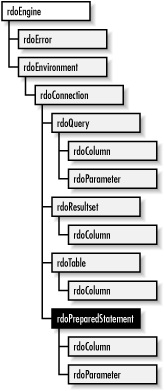
Microsoft's response to the developer's need for easier access to ODBC data sources came, in 1995, in the form of Remote Data Objects, or RDO. RDO provided more direct, and therefore faster, access to the ODBC API, as well as support for RDBMS sources. With RDO, the emphasis moved from data-access methods designed for ISAM databases toward techniques to provide for stored procedures and the results that they returned. RDO lacked some of the power that DAO offered with Jet (for instance, RDO is not designed to access ISAM sources and does not allow the creation of new databases), but it offered more power for newer, more robust enterprise systems.

The problem with RDO is that it is very different from the DAO architecture, which means two things. First, developers had to learn a new interface, and second, converting an existing DAO application to RDO involved a lot of additional development, because almost every piece of RDO differed from DAO, as you can see by comparing Figure 1-1 and Figure 1-2 (the RDO object model). With the introduction of RDO, developers chose between DAO and RDO instead of moving directly to RDO and abandoning DAO.

Figure 1-2. The RDO object model


1.1.1.3 ODBCDirect:
ODBCDirect was provided as part of a later release of DAO; to save time, it allows developers to work directly with Access sources without using Jet as the go-between. It is similar to DAO's object model but includes RDO's direct access to remote data sources.

1.1.2 OLE DB:
ODBC provides access only to relational databases. Its successor, Object Linking and Embedding Databases (OLE DB), includes all other data sources. OLE DB is the foundation upon which ADO relies.

OLE DB provides the following features:

Access to data regardless of its format or location (via COM -- see "ADO and COM: Language Independence" later in this chapter)

Full access to ODBC data sources and ODBC drivers A specification that Microsoft wants to act as a standard throughout the industry OLE DB comprises four types of components; Figure 1-3 shows their relationships, which are described here:
Data consumer: Any application or tool that accesses data from a data source. While the API calls that are available to access the data in your database are considered data providers, the application that uses that data itself is a data consumer, since it requests the data from the data provider. Data service provider The engine that makes OLE DB work; the resource necessary for a data provider to be able to provide data. A data service provider is a modular or add-on component that allows an application to deliver data through OLE DB. Data service providers are usually provided by the vendor for major products such as Oracle, DB2, and Informix. Microsoft promotes the creation of data service providers by either the manufacturer of the data provider or a third-party company.
Business component: A go-between for a data provider and a data consumer. In today's development environment, it is becoming more and more important not to develop in such a way that every object in your application manipulates your data. With a business component that you call to access your data, which in turn calls your database access component (ADO, RDO, ODBC, OLE DB, or ADO), then you need only modify the code in that business component.
Data provider: A component (application or database engine, for example) that delivers data from a data source (such as a database, spreadsheet, or email message) in a consistent manner.

Figure 1-3. OLE DB component relationships

ODBC, as we have just seen, is an excellent technology for accessing SQL-based data. OLE DB incorporates this proven technology with a particular component that allows OLE DB consumers to communicate directly with ODBC providers. In other words, use OLE DB to access SQL-based data, and you gain the advantage of being able to access both relational and other forms of data with the same code.
As they have done with ODBC, Microsoft is actively encouraging software vendors and tool developers to support the OLE DB standard within their applications and tools. Widespread standardization is an advantage for developers; with OLE DB, we can ensure that our applications become more robust and more powerful as they span the enterprise. Keep in mind that OLE DB was designed for software vendors who develop data-based applications to expose that data to you, an end-user developer, through a consistent interface. OLE DB is fast, efficient, and powerful. It has everything a developer looks for in a data-access technology. It offers access to any data source known to man (or to Windows, for that matter), and it provides access to these data sources with a consistent interface, regardless of data source. The problem with OLE DB is that, like ODBC, it is inaccessible to Visual Basic and other developers, because it is based on a C-style API. Visual Basic developers, in particular, needed more.

1.1.3 ADO:
Enter ActiveX Data Objects (ADO). ADO, an application-level interface to OLE DB, is the latest, greatest piece of Microsoft's UDA strategy. It combines the best features of its predecessors, DAO and RDO, and adds OLE DB accessibility for VBA programmers. ADO provides a consistent, language-independent means to access data from almost any source, including text-based or other legacy data in relational and nonrelational formats. (You can now see why I needed to explain some of the alphabet soup before getting to ADO itself.)

ADO comprises a collection of object libraries in a new, modular object model: in this new model, many objects can exist independently of the others, as you will see in later chapters of this book. The ADO object model is more flexible than the DAO object model, but it's similar, so programmers familiar with DAO will feel at home with ADO. ADO is a smaller version of DAO, generalized to allow easy access to any data source, not just Jet databases or ODBC data sources. The ADO object model simplifies data access more than DAO or RDO did by using fewer objects. See Figure 1-1 and also Chapter 2, for more information.

Used with OLE DB, ADO provides fast, simple access to almost any data source. It allows developers to use a single, consistent interface to new and legacy databases and other data sources of all formats, when creating desktop -- or web-based -- applications. ADO can also use the OLE DB provider for ODBC. Instead of removing the already proven and tested code for ODBC drivers, ADO allows you to use ODBC through the same interface you would for OLE DB. This may be an option when you have code you are migrating from RDO, which already uses ODBC.

ADO breaks the common characteristics of all data sources into easy-to-use components (which we will look at in Chapter 2). Consistency and language-independence are provided, so that developers can worry more about the content and quality of applications, rather than about the techniques used in delivering data or the type of data being used. What does language-independent development mean? It is quite simple -- one technology, one development interface. You will use the same object, method, and property names with ADO, regardless of the development language that you are using. The difference is almost unnoticeable. Under the covers, ADO, through COM (Component Object Model), worries about the particular language you are developing with, whether it is Visual Basic, Visual C++, or Java. Even scripting languages, such as VBScript and JavaScript in HTML pages are supported. We will look more closely into programming for these different languages in Chapter 3.
With this feature, you might expect that a lot of specific functionality of data sources would be lost. On the contrary, ADO allows the developer to access any data sourcespecific commands, methods, properties, and utilities that the vendor has made available through OLE DB. And yes, ADO does this in a well-structured, consistent way. Can you possibly ask for more?

As we will see in chapters to come, an application can be designed to access a simple database, such as Access, and with a little bit of additional code, it can later access more intricate databases, such as SQL Server databases, Word documents, or email files. The only real coding necessary involves altering the connection string used in ADO to read the new data source. This powerful technology will help us move into the future as applications begin to grow across enterprises.

1.1.4 RDS:
The final piece of data-access technology in this list of the MDAC components is Remote Data Services (RDS). RDS, based on existing Active Data Connector (ADC) technology integrated into ADO, transports ADO objects via proxy between server and client, thus allowing developers to create web-based applications that can access data on the server in new ways. Some of the advantages of RDS are:

Client-side caching of data results
Ability to update data from the client
Support for data-aware ActiveX components and controls

Client-side caching is something that we will all grow to love. With it, clients (end-users) are able to view data from the server without making numerous round trips. For instance, when you are using a search engine on the Internet, such as Yahoo!, you receive a list of links that relate to your search, usually in groups of tens. If you want to see the next ten sites from the resulting search, your browser must make another request to the server. With client-side caching, all of the data is sent to the client, so that the client can browse this data without incurring time delays that are associated with additional requests. This feature reduces local-area network and Internet traffic and allows the end-user to move

freely through data without unnecessary pauses and to perform operations on that data, such as sorting and filtering. With RDS, web pages can now offer the client the ability to interact with and alter data. This data can be sent back to the server after manipulation. At the server, the data can be verified and then returned to the data source. With this technology, your client/server applications can span the Internet (or your intranet). Clients can now invoke server-side automation objects through HTML, meaning that particular business rules (chosen by the developer) can be accessed via the client.
RDS enables three-tier client/server applications, with the model shown in Figure 1-4.

Figure 1-4. The three-tier client/server web-based application model


With automation objects, your application can become an auto-downloaded application. For businesses with a large number of client-side users, you can create, maintain, and update your application on the server alone. When clients run your application, they can use an ActiveX-aware browser (Internet Explorer) to access the application. With autodownload features built into the browser, the client receives an updated version of the application.

RDS also supports data-aware ActiveX controls that can be placed within an HTML page on a client. For instance, if you want to allow the client to view a list of documents that you have stored in your data source on the server, you could link RDS to an ActiveX list box control that is placed in the HTML page and downloaded to the client. The control interacts automatically with RDS, without any additional programming, to download all of the document names.
See Chapter 11, for a more detailed introduction to RDS.

1.1.5 Putting It All Together:
With the addition of RDS to its MDAC family of components, Microsoft has integrated several useful existing technologies into the universal data-access strategy: IE data-access technology for data-bound web pages, remote data capability through RDS, and ASP/IISrelated technologies for better access to data services via the Internet. The result allows applications to work with data offline to reduce network traffic, update data on remote clients, and gather data asynchronously for faster response time. Figure 1-5 shows the relationships and dependencies of the MDAC components.

Figure 1-5. MDAC architecture


As you can see from Figure 1-5, your application can use a number of different Microsoft-supplied technologies to access SQL -- as well as non-SQL and legacy -- data, such as that residing on a mainframe.

Until ADO, we had four choices: DAO, RDO, ODBC, and OLE DB. DAO served its purpose well: it used the power of the underlying ( Jet) database engine to access Microsoft and other ISAM data sources. With RDO, things were even better with its easy-to-use interface to ODBC and ability to access almost any SQL data source. Accessing ODBC directly was always a possibility, but it was questionable whether the overwhelming amount of work was worth the extra speed gained in the process. Finally, OLE DB offered everything under the sun. It offered access to ISAM, SQL, non-SQL, and legacy data. However wonderful OLE DB was, it is considered the most difficult interface with which to develop to access data sources. This is where ADO comes into play. ADO reports directly to OLE DB and no one else, meaning that it provides an interface to the whole complicated mess, about which we need to know little or nothing. ADO provides a consistent development interface to the wonders of OLE DB, and it does so while being language-independent.